


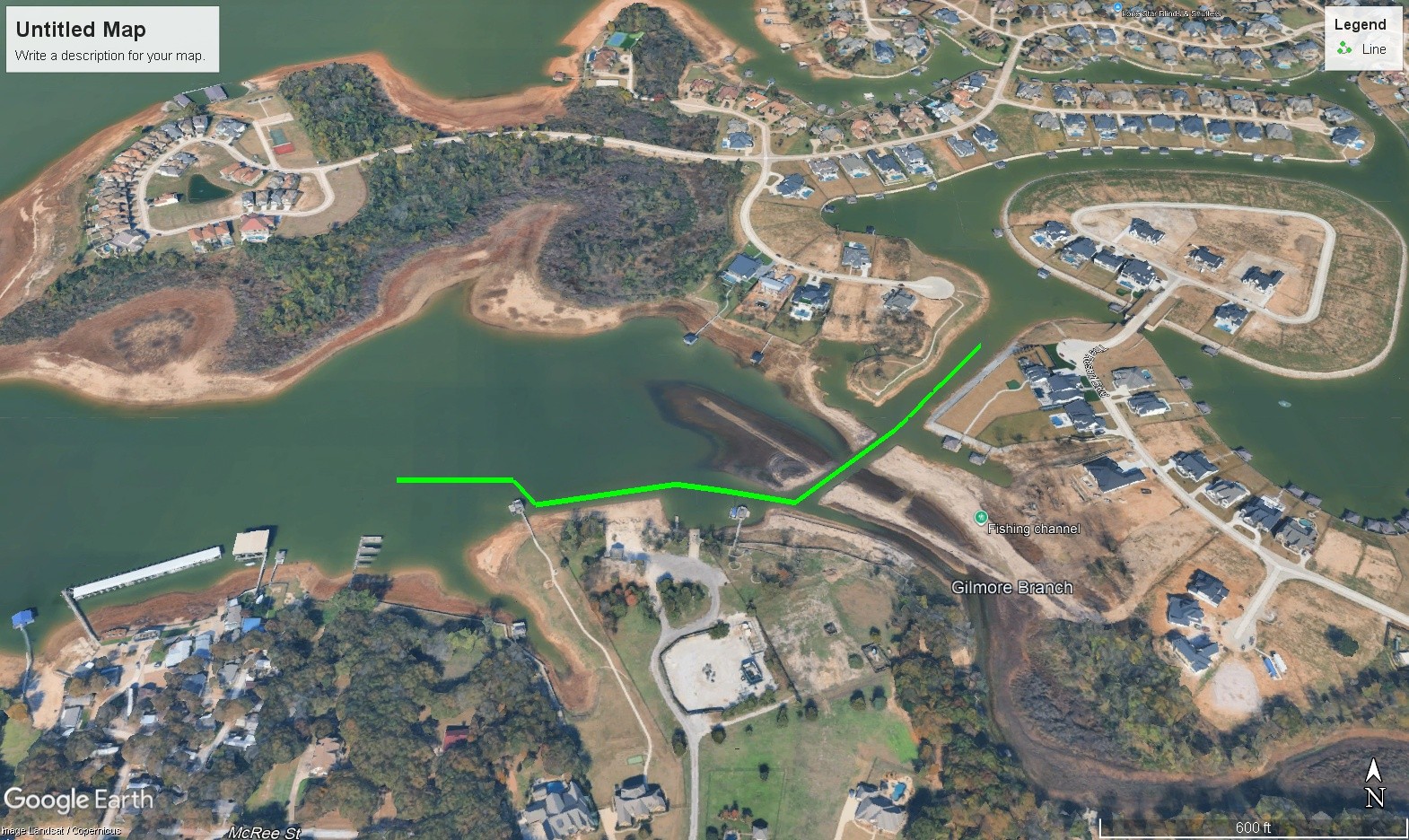
For those of you that live on the Canal at the Resort on Eagle Mountain Lake I have finally figured out a way for you to easily upload this KMZ file to help you locate the canal extension that Our Country Homes dredged a few years ago.
First thing you will do is to add the "Google Earth App" to your phone. Once that is done you can click the link below to this google drive link. This is a KMZ file specifically for use with the Google Earth App. Once you click on it you will download the file to "your files" in your phone.
Once you find the file on your phone titled The Resort Gilmore Creek South Entrance/Exit you would tap on that file. DO NOT CLICK preview content. Instead go to the upload arrow on the bottom right hand of your screen and tap on that. From there...along the the bottom of your screen you will see APPS such as--air drop, Messages, Mail, Notes, Outlook etc. scrolling to the right or left you will find the Google Earth App. Just tap on the Google Earth App and the Resort South Exit Path.KMZ file will automatically load.
You then should see the same picture as noted on this blog. On the right hand side of the screen you will see three circles...the top one has what I call a stick figure in it. The middle one has an arrow head in it. The bottom one says 3D. Tap on the middle one...the arrow. This will automatically locate your location with reference to the green line showing the canal path. When you are in your boat just match up the blue dot with the green line...and that should put you in the middle of the channel. I say should...because depending on what cell tower your phone is linked to...it could cause the tracker to be off by a few yards. So always go very slow and watch your depth finder.
The part along the Orchards beach/launch ramp is more shallow than the intersecting canal out of the Resort so beware of that. Also, just behind the Orchards launch ramp is a pile of sand the boats loading on trailers caused...so just know it is a little more shallow directly behind the boat ramp.
Lastly, intersecting the canal as soon as possble after the two story boat dock, as shown by the green line, is important. As there are some tree stumps just outside the dredged canal area.
I hope this helps.
https://drive.google.com/file/d/1PCWsiyZdzPkQvE02_lpWVbHHJ8om1U7s/view?usp=sharing